
How search works on Moonlit: Keyword and Intelligent Search
Moonlit offers two ways to search legal documents: keyword search for exact terms and Boolean queries, and intelligent search, adding meaning-based matching to also surface rulings phrased in different words.
4
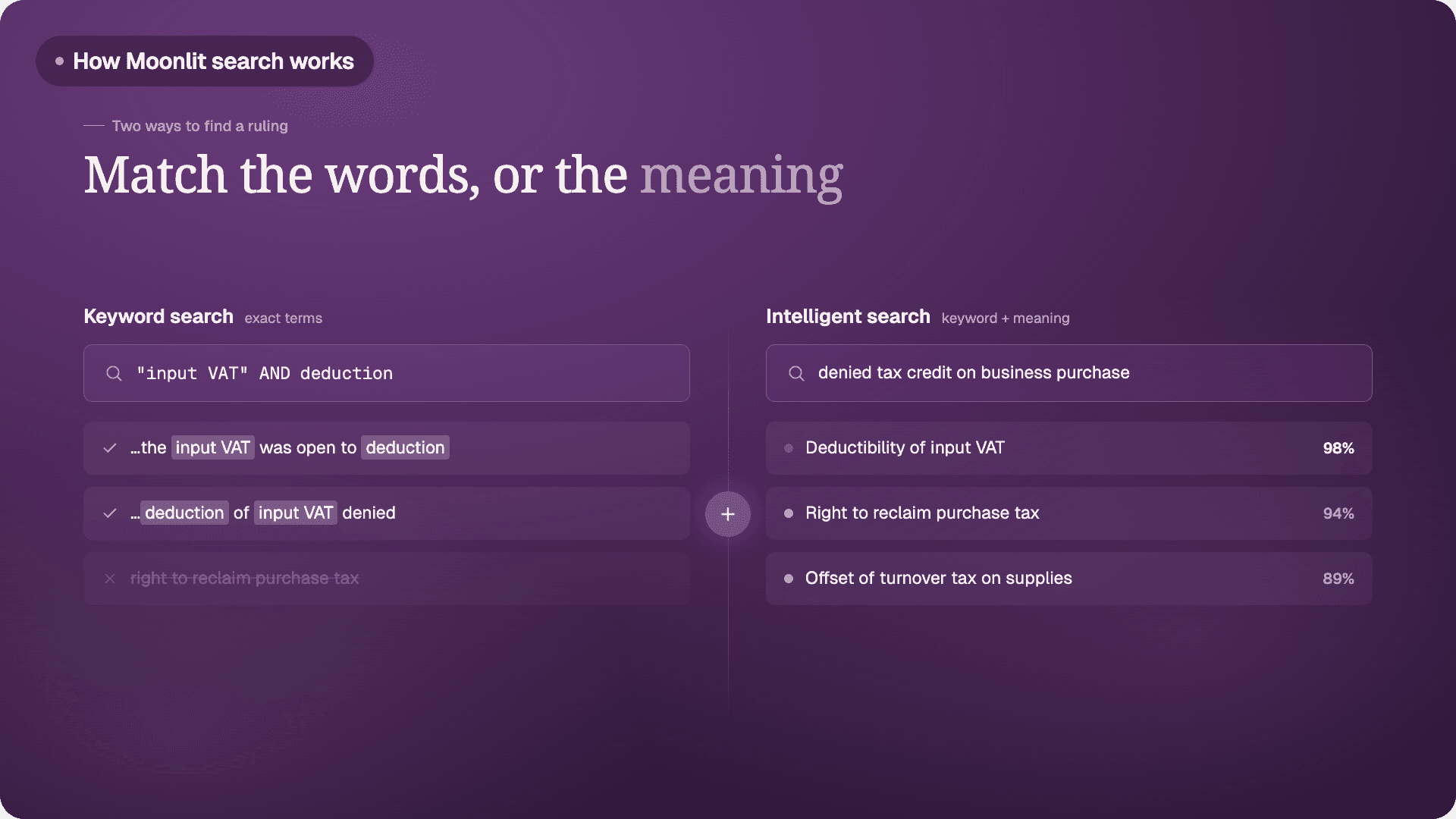
A tax lawyer opens Moonlit at her desk. Her client has just been reassessed over a disputed input VAT deduction, and she needs precedent before drafting the objection. Behind the search bar sit two ways of finding the information she needs: keyword search and intelligent search. Keyword search matches the exact words she types. Intelligent search combines that exact matching with meaning-based search, so it also surfaces rulings that describe the same question in different words. A lawyer can switch between the two depending on what she already knows and what she is still trying to find.
Keyword search: matching the words
Keyword search returns results that contain the exact terms typed into the search bar, ranked by how closely the text matches them. It does not attempt to interpret intent: it simply matches what was written. This precision serves a lawyer well in specific situations: a case number, a named party, or a phrase already known to appear in a ruling, all of which keyword search finds quickly and exactly.
It also supports Boolean operators, the AND, OR, and NOT connectors familiar from other legal databases, together with wildcards that stand in for variable word endings, so a lawyer can require several terms at once, exclude an unwanted one, or capture spelling variants in a single query.
Quotation marks add a further degree of control. A term placed inside them, such as "input VAT", is treated as an exact phrase: keyword search returns only documents where those words appear together and in that order.
The same words without quotation marks are treated as two separate terms that can appear anywhere in the text, in any order and not necessarily side by side, so a search for input VAT would also surface a ruling discussing "VAT charged on the input" or "input tax and reclaimed VAT".
Combined with the Boolean connectors, this lets a lawyer be precise about both which terms must appear and how they must sit together: a search such as "input VAT" AND deduction NOT "turnover tax" requires the exact phrase input VAT and the word deduction, while excluding any ruling that mentions turnover tax.
Legal language is, however, inconsistent across rulings. One decision refers to "deductibility of input VAT." Another describes the same underlying question as "the right to reclaim purchase tax." A keyword search for one term will not surface the other, even though both rulings concern exactly the same legal question.
Intelligent search: precision and reach combined
Intelligent search is the second mode on the platform, and it closes that gap. It runs two techniques together in a single query: the keyword matching described above, and semantic search, a meaning-based technique. Semantic search looks for documents that are conceptually close to a query rather than lexically identical to it. It works through embeddings, a numerical fingerprint that captures the meaning of a piece of text.
Two passages describing similar legal situations produce similar fingerprints, even when they share no words in common. Moonlit has generated these fingerprints across its document set, which is also what powers related-ruling suggestions and summaries elsewhere on the platform.
Semantic search is the meaning-based half of intelligent search, always paired with keyword matching. Together they keep the precision of exact-term matching for language a lawyer already knows, while adding the reach of meaning-based matching for phrasings she has not thought to search.
A query like "denied tax credit on business purchase" can then surface rulings on input VAT deduction even when that exact phrase never appears, because the match rests on the underlying legal situation rather than the specific words.
Available across the Moonlit platform
Keyword search and intelligent search are the two modes available through the Moonlit platform and through its API. For most research, intelligent search is the better starting point, because it combines exact-term matching with meaning-based search in a single query. Keyword search comes into its own in a few specific cases: locating a ruling by its exact citation, such as an ECLI number; finding decisions that name a particular party; or pulling the precise text of a known statutory article. In each, the lawyer wants only documents that contain that exact term, and the interpretive reach of intelligent search would widen the results rather than narrow them.

Article written by
Lara Olders